> ## Documentation Index
> Fetch the complete documentation index at: https://auth0.com/ai/docs/llms.txt
> Use this file to discover all available pages before exploring further.
# Why use Auth for MCP
> Benefits of using Auth0 to authenticate users before they or their AI Agents connect to MCP Servers.
Auth for MCP supports Auth0’s Universal Login, which allows users to sign in using social, enterprise, or custom identity providers. Every access token issued through Auth0 carries verified identity context, ensuring all MCP interactions start from a trusted source.
## Why authentication matters for MCP
* Secure and controlled access: Safeguards user data, manages who can use your MCP server and what they can do, and establishes a clear audit trail for activities performed through MCP servers and clients.
* Auditability: Provides a record of user activities for auditing and compliance.
## Why use Auth for MCP?
MCP offers practical advantages, such as standardized interfaces for LLMs to interact with tools and LLM-facing tools with rich context and metadata.
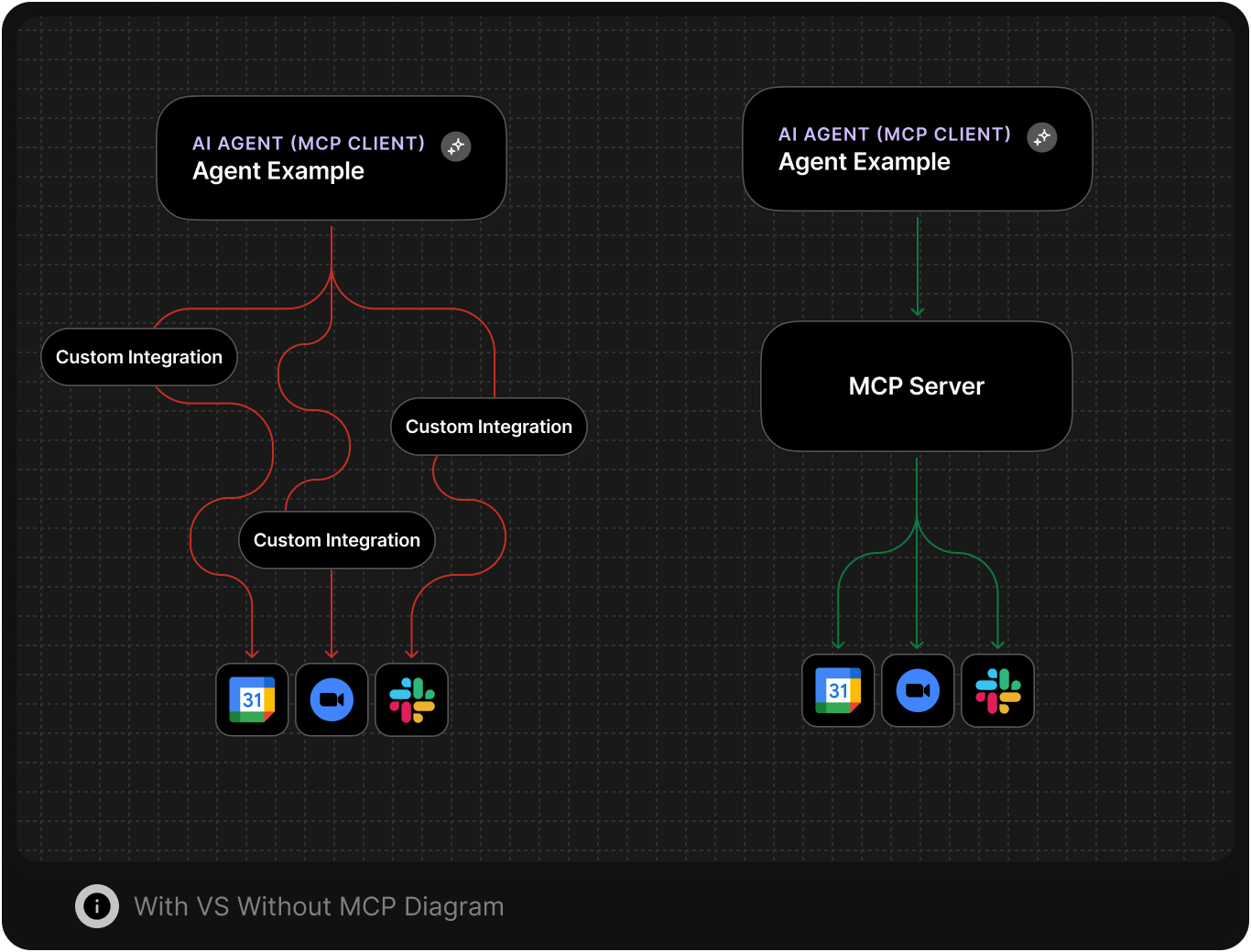
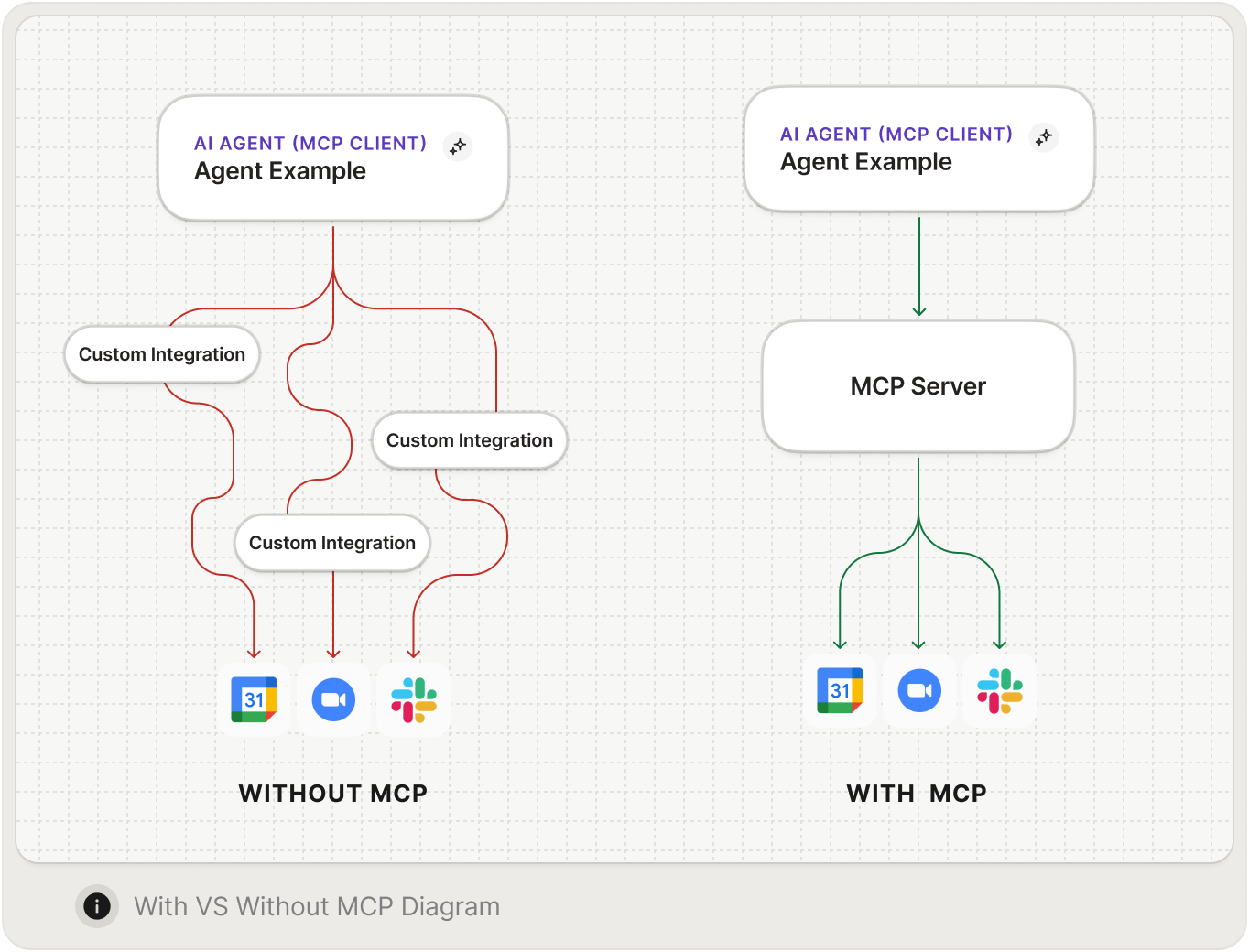 Auth0 allows your users to securely interact with trusted agents without worrying about LLMs gaining access to sensitive information like access tokens: Auth0 enforces scoped, identity-bound, least-privilege access for AI agents, both first-party and third-party APIs.
Auth0 manages consent flows and per-client permissions, secures credentials via Token Vault and Token Exchange while making it possible to audit logs and keep track of lifecycle events.
The MCP specification highlights several key OAuth 2.1 features that Auth0 provides:
* **Manual Client ID Metadata Document (CIMD) Registration:** Crucial for secure, centralized deployment. It allows tenant administrators to register an MCP client once with the appropriate client metadata URI and deploy it across multiple users and environments.
* **Proof Key for Code Exchange (PKCE):** [PKCE](https://auth0.com/docs/get-started/authentication-and-authorization-flow/authorization-code-flow-with-pkce) is a mandatory security feature that mitigates authorization code interception and is handled automatically in Auth0's SDKs.
* **Metadata Discovery:** This is mandatory per the MCP spec. Servers must advertise their OAuth endpoints. An Auth0 tenant provides [an authorization server discovery document](https://auth0.com/docs/get-started/applications/configure-applications-with-oidc-discovery#configure-applications-with-oauth-2-0-authorization-server-metadata) (`/.well-known/oauth-authorization-server`) so MCP clients can dynamically find the required endpoints for authorization, token exchange, etc., reducing manual client-side configuration.
* **Delegating Authentication to a Third-Party Identity Provider (IdP):** The specification supports delegating the user login process. You can configure your MCP server to use Auth0 as the trusted identity provider, centralizing user management and sign-on logic.
* **On-Behalf-Of (OBO) Token Exchange**: Call first-party APIs by exchanging an Auth0 access token for a new token set to a different audience.
## Authentication for users of MCP Servers
Auth0 is a flexible, drop-in solution to add authentication and authorization services to your applications. With Auth0, your users can log in with:
* Username and password
* [Passwordless and Passkeys](https://auth0.com/docs/authenticate/passwordless)
* [Social Login (Google, Meta, Microsoft, GitHub, etc.)](https://auth0.com/docs/authenticate/passwordless#social-login)
* [Corporate credentials and Single Sign-On (SSO)](https://auth0.com/docs/authenticate/single-sign-on) for B2B AI applications
* And more.
Auth0 also provides the following features for enhanced security and scalability:
* [Multi-factor Authentication](https://auth0.com/docs/secure/multi-factor-authentication)
* [Attack Protection](https://auth0.com/docs/secure/attack-protection): Detect attacks and stop malicious attempts to access your application, such as blocking traffic from certain IPs and displaying CAPTCHA. This includes Bot Detection, Suspicious IP Throttling, Brute Force Protection, and Breached Password Detection.
* [Highly Regulated Identity](https://auth0.com/docs/secure/highly-regulated-identity)
* UI and login flow customizations via [Actions](https://auth0.com/docs/customize/actions) and [Forms](https://auth0.com/docs/customize/forms)
## MCP Authorization flow with Auth0
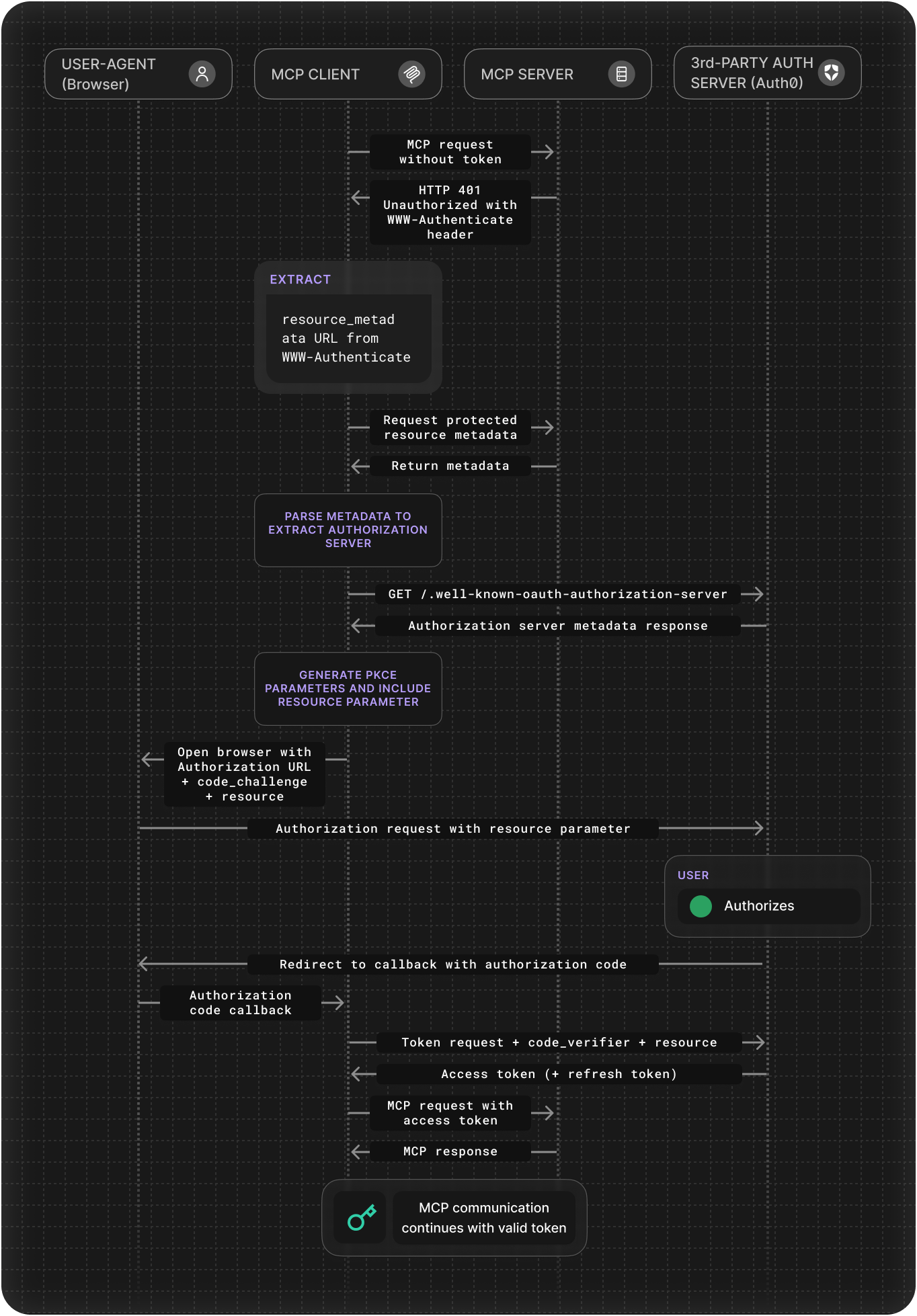
Here is the standard OAuth authorization code flow when an MCP server uses Auth0 as its authorization server:
The MCP client sends a request to the protected MCP server and receives HTTP `401 Unauthorized` with a `WWW-Authenticate` header that indicates the protected resource metadata URL.
The MCP client requests the [resource metadata](https://datatracker.ietf.org/doc/html/rfc9728/) from the MCP server at the `/.well-known/oauth-protected-resource` endpoint.
The MCP client parses the metadata, selects an authorization server (Auth0) from the list, and then fetches its OAuth 2.0 Authorization Server Metadata from the `/.well-known/oauth-authorization-server` endpoint. [Dynamic Client Registration (DCR)](https://auth0.com/docs/get-started/applications/dynamic-client-registration#enable-dynamic-client-registration) can happen after receiving the metadata response.
The client generates [PKCE](https://auth0.com/docs/get-started/authentication-and-authorization-flow/authorization-code-flow-with-pkce) parameters and builds the authorization request, then opens the browser to the authorization endpoint.
The user then authenticates with Auth0 (using username/password, social login, or MFA). Auth0 redirects the browser to the MCP client’s registered redirect URI with an authorization code.
The MCP client exchanges the code at the token endpoint and Auth0 returns the access token, completing the original OAuth flow.
After receiving an access token (and refresh token), the MCP client will use the access token to make authenticated calls to the MCP server's tools.
Auth0 allows your users to securely interact with trusted agents without worrying about LLMs gaining access to sensitive information like access tokens: Auth0 enforces scoped, identity-bound, least-privilege access for AI agents, both first-party and third-party APIs.
Auth0 manages consent flows and per-client permissions, secures credentials via Token Vault and Token Exchange while making it possible to audit logs and keep track of lifecycle events.
The MCP specification highlights several key OAuth 2.1 features that Auth0 provides:
* **Manual Client ID Metadata Document (CIMD) Registration:** Crucial for secure, centralized deployment. It allows tenant administrators to register an MCP client once with the appropriate client metadata URI and deploy it across multiple users and environments.
* **Proof Key for Code Exchange (PKCE):** [PKCE](https://auth0.com/docs/get-started/authentication-and-authorization-flow/authorization-code-flow-with-pkce) is a mandatory security feature that mitigates authorization code interception and is handled automatically in Auth0's SDKs.
* **Metadata Discovery:** This is mandatory per the MCP spec. Servers must advertise their OAuth endpoints. An Auth0 tenant provides [an authorization server discovery document](https://auth0.com/docs/get-started/applications/configure-applications-with-oidc-discovery#configure-applications-with-oauth-2-0-authorization-server-metadata) (`/.well-known/oauth-authorization-server`) so MCP clients can dynamically find the required endpoints for authorization, token exchange, etc., reducing manual client-side configuration.
* **Delegating Authentication to a Third-Party Identity Provider (IdP):** The specification supports delegating the user login process. You can configure your MCP server to use Auth0 as the trusted identity provider, centralizing user management and sign-on logic.
* **On-Behalf-Of (OBO) Token Exchange**: Call first-party APIs by exchanging an Auth0 access token for a new token set to a different audience.
## Authentication for users of MCP Servers
Auth0 is a flexible, drop-in solution to add authentication and authorization services to your applications. With Auth0, your users can log in with:
* Username and password
* [Passwordless and Passkeys](https://auth0.com/docs/authenticate/passwordless)
* [Social Login (Google, Meta, Microsoft, GitHub, etc.)](https://auth0.com/docs/authenticate/passwordless#social-login)
* [Corporate credentials and Single Sign-On (SSO)](https://auth0.com/docs/authenticate/single-sign-on) for B2B AI applications
* And more.
Auth0 also provides the following features for enhanced security and scalability:
* [Multi-factor Authentication](https://auth0.com/docs/secure/multi-factor-authentication)
* [Attack Protection](https://auth0.com/docs/secure/attack-protection): Detect attacks and stop malicious attempts to access your application, such as blocking traffic from certain IPs and displaying CAPTCHA. This includes Bot Detection, Suspicious IP Throttling, Brute Force Protection, and Breached Password Detection.
* [Highly Regulated Identity](https://auth0.com/docs/secure/highly-regulated-identity)
* UI and login flow customizations via [Actions](https://auth0.com/docs/customize/actions) and [Forms](https://auth0.com/docs/customize/forms)
## MCP Authorization flow with Auth0
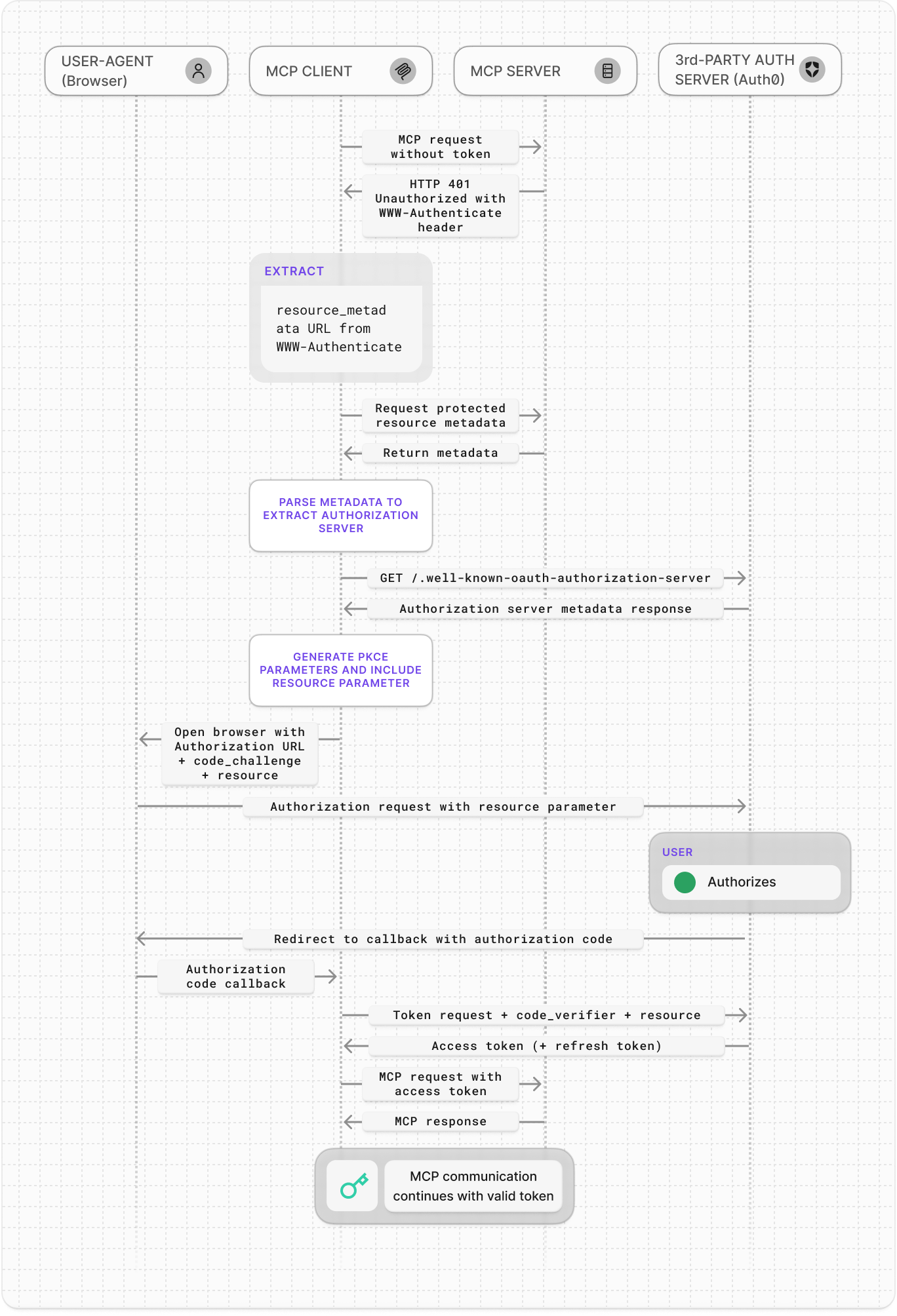
Here is the standard OAuth authorization code flow when an MCP server uses Auth0 as its authorization server:
The MCP client sends a request to the protected MCP server and receives HTTP `401 Unauthorized` with a `WWW-Authenticate` header that indicates the protected resource metadata URL.
The MCP client requests the [resource metadata](https://datatracker.ietf.org/doc/html/rfc9728/) from the MCP server at the `/.well-known/oauth-protected-resource` endpoint.
The MCP client parses the metadata, selects an authorization server (Auth0) from the list, and then fetches its OAuth 2.0 Authorization Server Metadata from the `/.well-known/oauth-authorization-server` endpoint. [Dynamic Client Registration (DCR)](https://auth0.com/docs/get-started/applications/dynamic-client-registration#enable-dynamic-client-registration) can happen after receiving the metadata response.
The client generates [PKCE](https://auth0.com/docs/get-started/authentication-and-authorization-flow/authorization-code-flow-with-pkce) parameters and builds the authorization request, then opens the browser to the authorization endpoint.
The user then authenticates with Auth0 (using username/password, social login, or MFA). Auth0 redirects the browser to the MCP client’s registered redirect URI with an authorization code.
The MCP client exchanges the code at the token endpoint and Auth0 returns the access token, completing the original OAuth flow.
After receiving an access token (and refresh token), the MCP client will use the access token to make authenticated calls to the MCP server's tools.
 ## Enterprise Identity for MCP
For enterprise environments, you can use your organization's identity provider and Single Sign-On (SSO) to authenticate users to your MCP servers. Auth0 connects to Okta, Entra ID, Ping, Google Workspace, and other IdPs so employees can authenticate with existing credentials before any MCP connection begins.
This pattern provides:
* Unified workforce authentication and MFA for MCP Servers
* Centralized access policy enforcement and device posture checks
* Consistent session context across all agent interactions
Enterprise identity ensures that every request to an MCP Server originates from a verified employee identity governed by your enterprise security controls.
## Get started
To begin using Auth for MCP in your MCP server, refer to the following resources:
### Quickstarts
### Sample Apps
## Enterprise Identity for MCP
For enterprise environments, you can use your organization's identity provider and Single Sign-On (SSO) to authenticate users to your MCP servers. Auth0 connects to Okta, Entra ID, Ping, Google Workspace, and other IdPs so employees can authenticate with existing credentials before any MCP connection begins.
This pattern provides:
* Unified workforce authentication and MFA for MCP Servers
* Centralized access policy enforcement and device posture checks
* Consistent session context across all agent interactions
Enterprise identity ensures that every request to an MCP Server originates from a verified employee identity governed by your enterprise security controls.
## Get started
To begin using Auth for MCP in your MCP server, refer to the following resources:
### Quickstarts
### Sample Apps