> ## Documentation Index
> Fetch the complete documentation index at: https://auth0.com/ai/docs/llms.txt
> Use this file to discover all available pages before exploring further.
# Auth for MCP
> Enable MCP clients to securely connect to MCP servers with Auth0.
The [Model Context Protocol (MCP)](https://modelcontextprotocol.io/) is an open standard for connecting AI applications to external data sources, tools, and workflows through a consistent interface. It lets agents use your SaaS apps and internal APIs, run organization-specific workflows, and reuse integrations instead of building one-offs.
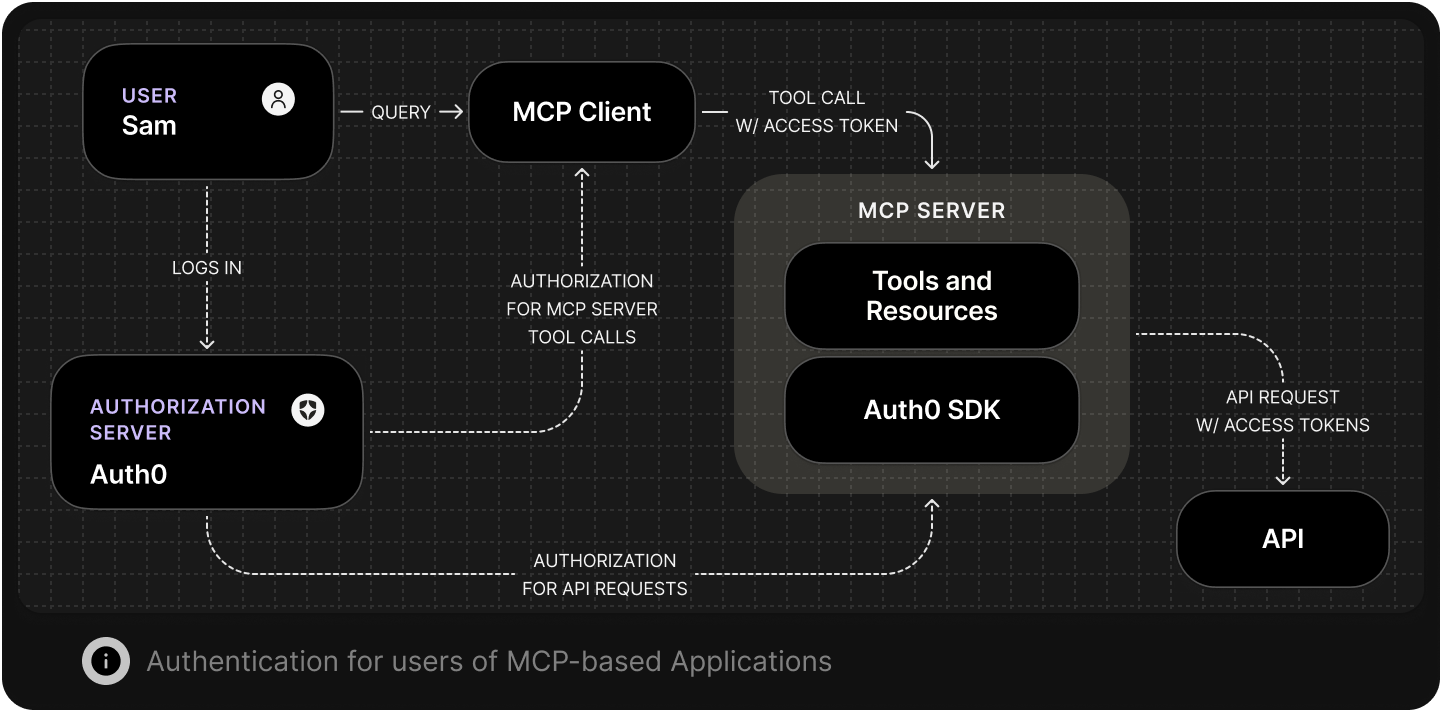
 Auth0's **Auth for MCP** lets developers securely and easily implement the authorization parts of the MCP spec with OAuth 2.1 and OpenID Connect. It provides sign in, standards based discovery and client registration, resource scoped tokens, and token exchange so you can control which agents connect, which resources they can access, and which actions they can perform.
### Accessing a Protected MCP Server
When an MCP server is protected with Auth0, clients and AI agents must first obtain an OAuth 2.0 access token to access it. Auth0 manages the authorization flow, ensuring the user authenticates with their chosen identity provider such as Okta, Entra ID, Ping, or Google Workspace, and delegates limited permissions to the agent.
The MCP client then uses the issued token to call the server. Auth0 handles authentication, token issuance and delegation of permissions. The MCP server then validates the token and enforces the authorization decisions represented in it.
### Metadata Discovery and Client Registration for MCP
Register MCP clients and servers using standards-aligned discovery and registration so agents connect only to approved resources. Auth0 validates client metadata, issues client credentials, and exposes the necessary discovery endpoints. This lets MCP clients find the right authorization server and request tokens without manual configuration.
### Call your APIs on a user's behalf
When an **AI agent** connects to your **MCP server**, the server may need to call your internal APIs to read data or trigger workflows. Those APIs need tokens that reflect who the user is and what the server is allowed to do.
Auth0 implements the On-Behalf-Of Token Exchange to enable that delegation. The MCP server exchanges the token it received from the client for a new, short-lived access token scoped to the internal API. This lets **MCP servers** call internal APIs on behalf of users while **Auth0** issues and governs access centrally.
### Call third-party APIs on a user's behalf
MCP Servers often connect AI Agents to third-party services such as Google, Microsoft, Jira, or Notion. Auth0’s **Token Vault** handles these integrations by managing token issuance, storage, rotation, and revocation for external APIs. Token Vault eliminates manual credential handling and makes it easy to extend MCP connectivity across the modern SaaS ecosystem.
## Get started
To begin using Auth for MCP in your MCP server, refer to the following resources:
### Quickstarts
### Guides
### Sample apps
### SDKs
Auth0's **Auth for MCP** lets developers securely and easily implement the authorization parts of the MCP spec with OAuth 2.1 and OpenID Connect. It provides sign in, standards based discovery and client registration, resource scoped tokens, and token exchange so you can control which agents connect, which resources they can access, and which actions they can perform.
### Accessing a Protected MCP Server
When an MCP server is protected with Auth0, clients and AI agents must first obtain an OAuth 2.0 access token to access it. Auth0 manages the authorization flow, ensuring the user authenticates with their chosen identity provider such as Okta, Entra ID, Ping, or Google Workspace, and delegates limited permissions to the agent.
The MCP client then uses the issued token to call the server. Auth0 handles authentication, token issuance and delegation of permissions. The MCP server then validates the token and enforces the authorization decisions represented in it.
### Metadata Discovery and Client Registration for MCP
Register MCP clients and servers using standards-aligned discovery and registration so agents connect only to approved resources. Auth0 validates client metadata, issues client credentials, and exposes the necessary discovery endpoints. This lets MCP clients find the right authorization server and request tokens without manual configuration.
### Call your APIs on a user's behalf
When an **AI agent** connects to your **MCP server**, the server may need to call your internal APIs to read data or trigger workflows. Those APIs need tokens that reflect who the user is and what the server is allowed to do.
Auth0 implements the On-Behalf-Of Token Exchange to enable that delegation. The MCP server exchanges the token it received from the client for a new, short-lived access token scoped to the internal API. This lets **MCP servers** call internal APIs on behalf of users while **Auth0** issues and governs access centrally.
### Call third-party APIs on a user's behalf
MCP Servers often connect AI Agents to third-party services such as Google, Microsoft, Jira, or Notion. Auth0’s **Token Vault** handles these integrations by managing token issuance, storage, rotation, and revocation for external APIs. Token Vault eliminates manual credential handling and makes it easy to extend MCP connectivity across the modern SaaS ecosystem.
## Get started
To begin using Auth for MCP in your MCP server, refer to the following resources:
### Quickstarts
### Guides
### Sample apps
### SDKs