> ## Documentation Index
> Fetch the complete documentation index at: https://auth0.com/ai/docs/llms.txt
> Use this file to discover all available pages before exploring further.
# Enable Resource Parameter Compatibility Profile
> Learn how to enable the resource parameter in Auth0.
The Model Context Protocol (MCP) specification requires the use of the standards-compliant `resource` parameter as defined in [RFC 8707](https://www.rfc-editor.org/rfc/rfc8707.html). Auth0's Authentication API has historically used the `audience` parameter to specify a target resource server (API). This document outlines the new `resource` parameter and provides instructions for enabling the new compatibility profile.
## Enabling Resource Parameter Compatibility Profile
To use the `resource` parameter in your access tokens and the `iss` claim to identify your authorization server, you need to enable two toggles in the [Auth0 Dashboard](https://manage.auth0.com/dashboard/):
1. Navigate to **Settings** on the left sidebar.
2. Select [**Advanced**](https://manage.auth0.com/dashboard/#/tenant/advanced) in the top right corner.
3. Scroll down to the **Settings** section and enable the following toggles:
* **Resource Parameter Compatibility Profile**: Enables support for the `resource` parameter in authorization requests, allowing access tokens to be scoped to a specific API.
* **Include Issuer in Authorization Responses**: Includes the `iss` parameter identifying the authorization server in authorization responses, helping clients defend against mix-up attacks.
## How it works
When disabled, the **Resource Parameter Compatibility Profile** will keep the experience as is and only use the `audience` parameter in the Auth0 access token.
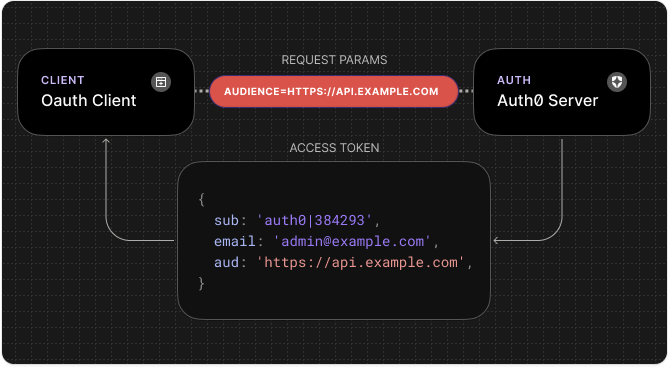
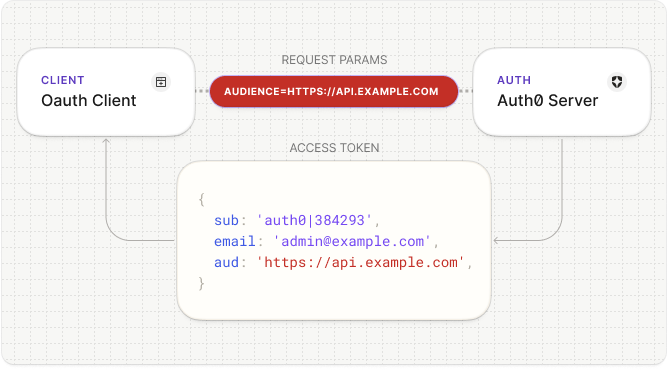 Once the **Resource Parameter Compatibility Profile** is enabled, Auth0 will use the `resource` parameter if it is available to define the token's audience.
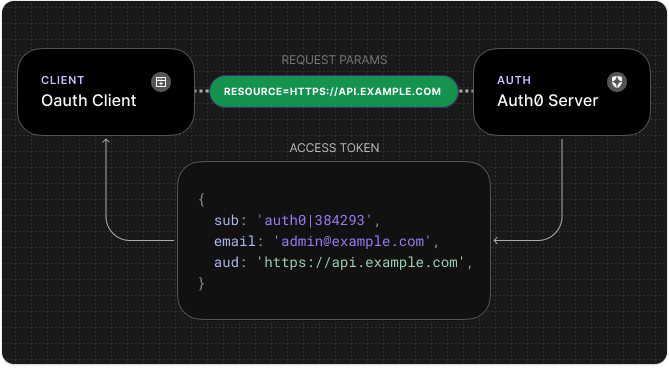
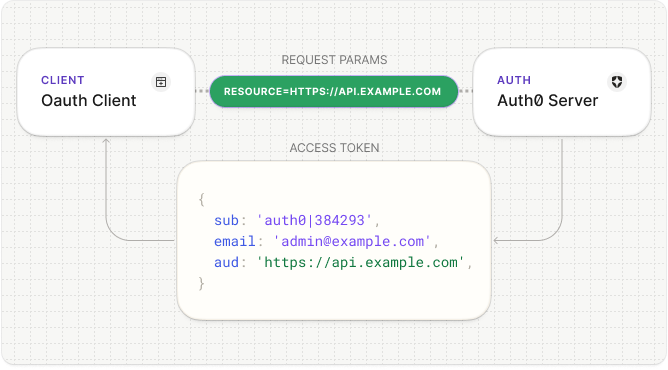 If both the `resource` and `audience` are available, the `audience` will still be used. Auth0 will not forward the `resource` to upstream Identity Providers (IdPs). [Learn more](./resource-param-compatibility-profile#resource-parameter-forwarding-to-upstream-identity-provider-idp).
*RFC 8707 requires the `resource` parameter to [be an absolute URI](https://www.rfc-editor.org/rfc/rfc8707.html#name-resource-parameter), to conform with RFC 8707, we recommend defining your resource server identifiers (API identifiers) in [URI format](https://datatracker.ietf.org/doc/html/rfc3986). Using an absolute URI as the identifier of your MCP Server is also a requirement from the MCP Authorization specification.*
## Supported flows
The `resource` parameter is supported in the following flows:
* Standard Authorization Flow (`/authorize`)
* Pushed Authorization Requests (PAR)
* JWT-Secured Authorization Requests (JAR)
* Client-Initiated Backchannel Authentication (CIBA)
* Refresh Token Grant Type
## Resource Parameter Forwarding to Upstream Identity Provider (IdP)
When federating to an upstream IdP, Auth0 provides a way for initiating clients to [forward parameters](https://auth0.com/docs/authenticate/identity-providers/pass-parameters-to-idps). In the documentation, notice that `resource` is one of the parameters [available for forwarding to upstream IdPs](https://auth0.com/docs/authenticate/identity-providers/pass-parameters-to-idps#available-fields).
RFC 8707 requires the `resource` parameter to be an absolute URI. To conform with RFC 8707, we recommend defining your resource server identifiers (API identifiers) in URI format. To avoid leaking access token details, Auth0 will not forward the resource parameter to upstream IdPs while the Resource Parameter Compatibility Profile is enabled.
* Resource Parameter Compatibility **disabled** (default behavior):
* `resource` is available as an upstream IdP parameter.
* Resource Parameter Compatibility **enabled**:
* `resource` is not available as an upstream IdP parameter, and will not be forwarded.
If passing the resource parameter to an upstream IdP, the Resource Parameter Compatibility Profile should not be enabled.
If both the `resource` and `audience` are available, the `audience` will still be used. Auth0 will not forward the `resource` to upstream Identity Providers (IdPs). [Learn more](./resource-param-compatibility-profile#resource-parameter-forwarding-to-upstream-identity-provider-idp).
*RFC 8707 requires the `resource` parameter to [be an absolute URI](https://www.rfc-editor.org/rfc/rfc8707.html#name-resource-parameter), to conform with RFC 8707, we recommend defining your resource server identifiers (API identifiers) in [URI format](https://datatracker.ietf.org/doc/html/rfc3986). Using an absolute URI as the identifier of your MCP Server is also a requirement from the MCP Authorization specification.*
## Supported flows
The `resource` parameter is supported in the following flows:
* Standard Authorization Flow (`/authorize`)
* Pushed Authorization Requests (PAR)
* JWT-Secured Authorization Requests (JAR)
* Client-Initiated Backchannel Authentication (CIBA)
* Refresh Token Grant Type
## Resource Parameter Forwarding to Upstream Identity Provider (IdP)
When federating to an upstream IdP, Auth0 provides a way for initiating clients to [forward parameters](https://auth0.com/docs/authenticate/identity-providers/pass-parameters-to-idps). In the documentation, notice that `resource` is one of the parameters [available for forwarding to upstream IdPs](https://auth0.com/docs/authenticate/identity-providers/pass-parameters-to-idps#available-fields).
RFC 8707 requires the `resource` parameter to be an absolute URI. To conform with RFC 8707, we recommend defining your resource server identifiers (API identifiers) in URI format. To avoid leaking access token details, Auth0 will not forward the resource parameter to upstream IdPs while the Resource Parameter Compatibility Profile is enabled.
* Resource Parameter Compatibility **disabled** (default behavior):
* `resource` is available as an upstream IdP parameter.
* Resource Parameter Compatibility **enabled**:
* `resource` is not available as an upstream IdP parameter, and will not be forwarded.
If passing the resource parameter to an upstream IdP, the Resource Parameter Compatibility Profile should not be enabled.