> ## Documentation Index
> Fetch the complete documentation index at: https://auth0.com/ai/docs/llms.txt
> Use this file to discover all available pages before exploring further.
# Call Other's APIs on User's Behalf
> [Token Vault](/intro/token-vault) lets your AI agent call external APIs on the user's behalf. We provide SDKs for Python, JavaScript, and popular AI frameworks like LangChain, LlamaIndex, Genkit, and Vercel AI, making it easy and straightforward to get access tokens for external applications.
## Applications with refresh tokens
In a typical scenario, a user interacts with a frontend application (e.g., a chatbot interface). This frontend communicates with a secure backend service, often a Backend for Frontend (BFF) or an agent, which is responsible for calling the external API. Such applications can use refresh tokens for long-lived sessions and use the same refresh tokens to securely call external APIs on the user's behalf via Token Vault.
If your application uses [Organizations](https://auth0.com/docs/manage-users/organizations), authenticate the user with the target organization before authorizing the external provider through Connected Accounts. Organizations determine the session context, but Token Vault still exchanges tokens for the individual signed-in user.
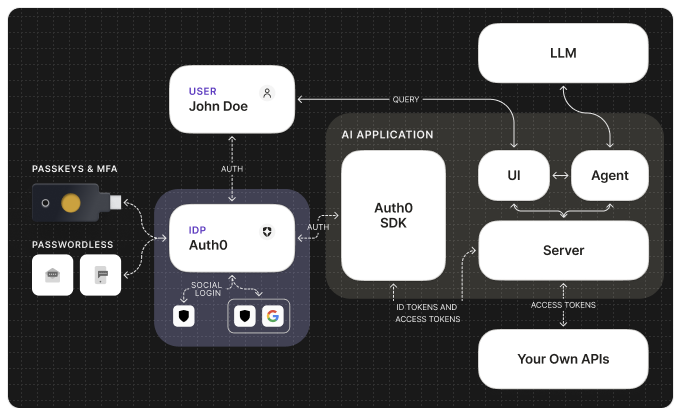
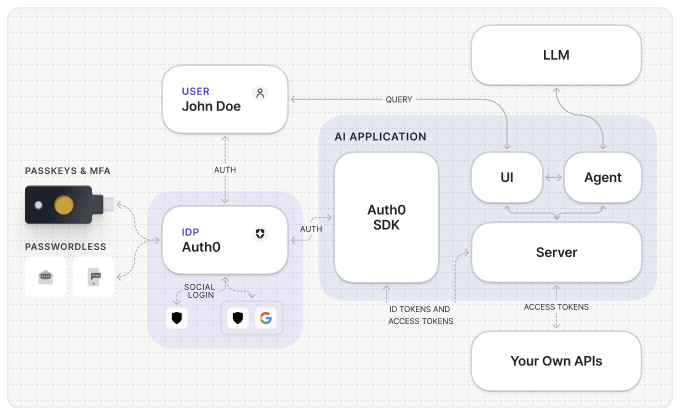 By modeling your agent's backend as a secure application, it can obtain the necessary tokens from Token Vault to interact with external APIs while maintaining the user's context and permissions.
## Applications without refresh tokens
In scenarios where refresh tokens cannot be used, such as single-page applications (SPAs) or headless agents and CLIs, you can still call external APIs on the user's behalf via Token Vault using Auth0 access tokens. To do so, use the Auth0 Dashboard to configure the following:
* [An API in Auth0](https://auth0.com/docs/get-started/auth0-overview/set-up-apis): You need to register an API in the Auth0 Dashboard with the appropriate settings.
* A Custom API Client in Auth0: The Custom API Client allows your API server to perform token exchanges using access tokens instead of refresh tokens. This client enables Token Vault to exchange an access token for an external API access token (e.g., Google Calendar API).
By modeling your agent's backend as a secure application, it can obtain the necessary tokens from Token Vault to interact with external APIs while maintaining the user's context and permissions.
## Applications without refresh tokens
In scenarios where refresh tokens cannot be used, such as single-page applications (SPAs) or headless agents and CLIs, you can still call external APIs on the user's behalf via Token Vault using Auth0 access tokens. To do so, use the Auth0 Dashboard to configure the following:
* [An API in Auth0](https://auth0.com/docs/get-started/auth0-overview/set-up-apis): You need to register an API in the Auth0 Dashboard with the appropriate settings.
* A Custom API Client in Auth0: The Custom API Client allows your API server to perform token exchanges using access tokens instead of refresh tokens. This client enables Token Vault to exchange an access token for an external API access token (e.g., Google Calendar API).
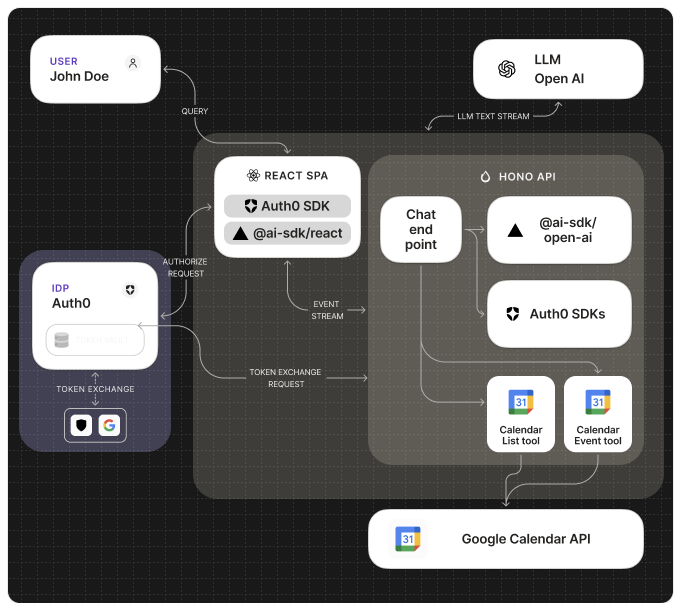
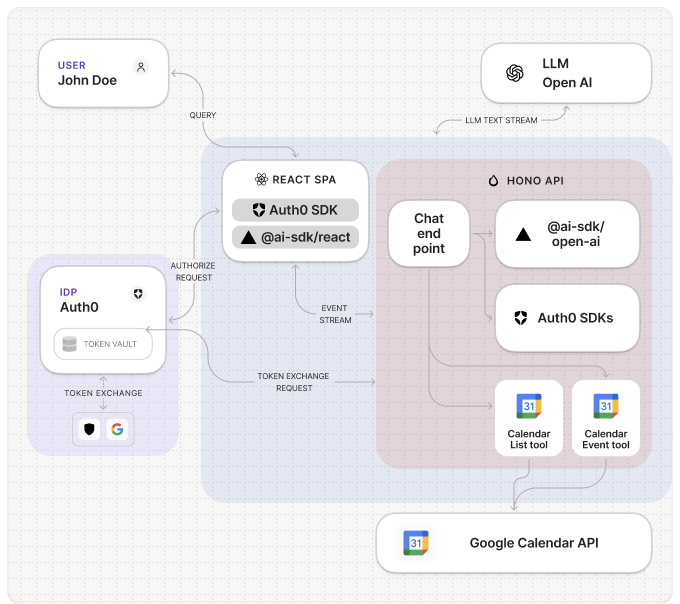 Check out this [guide](/ai/docs/get-started/call-others-apis-on-users-behalf#vercel-ai-%2B-react-spa) for an example.
## Get started
To begin using Auth0 Token Vault with your AI agents, refer to the following resources:
### Quickstarts
### Guides
### Sample Apps
}
horizontal
/>
}
horizontal
/>
}
horizontal
/>
}
horizontal
/>
### Learn more
Check out this [guide](/ai/docs/get-started/call-others-apis-on-users-behalf#vercel-ai-%2B-react-spa) for an example.
## Get started
To begin using Auth0 Token Vault with your AI agents, refer to the following resources:
### Quickstarts
### Guides
### Sample Apps
}
horizontal
/>
}
horizontal
/>
}
horizontal
/>
}
horizontal
/>
### Learn more